Financial
Costs: flights, hotels and crew
Fees are what the promoter pays. Costs are what the show costs: flights, hotels, trains, crew, visas, dinners. For every cost Artistu needs to know one thing above all: whose money does it come out of? That decides what ends up on the artist's statement.
We use the same booking as in How money flows through Artistu: DJ Mosa at Havenhall, Rotterdam. The agency booked a €320 flight for the artist and the tour manager, and deducts it from the artist fee.
Where to find it
Costs live in the Costs card on the booking's Deal tab, below the fees and the deal terms:
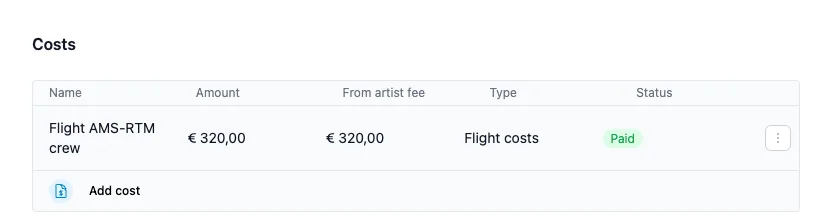
- Amount is the full cost.
- From artist fee is the part that is deducted from the artist fee. Here the whole €320.
- Status shows whether the cost is still a draft or already paid.
Click Add cost to add one, or click a cost to change it. The ⋮ menu has Duplicate, Split cost and Remove.
The cost editor
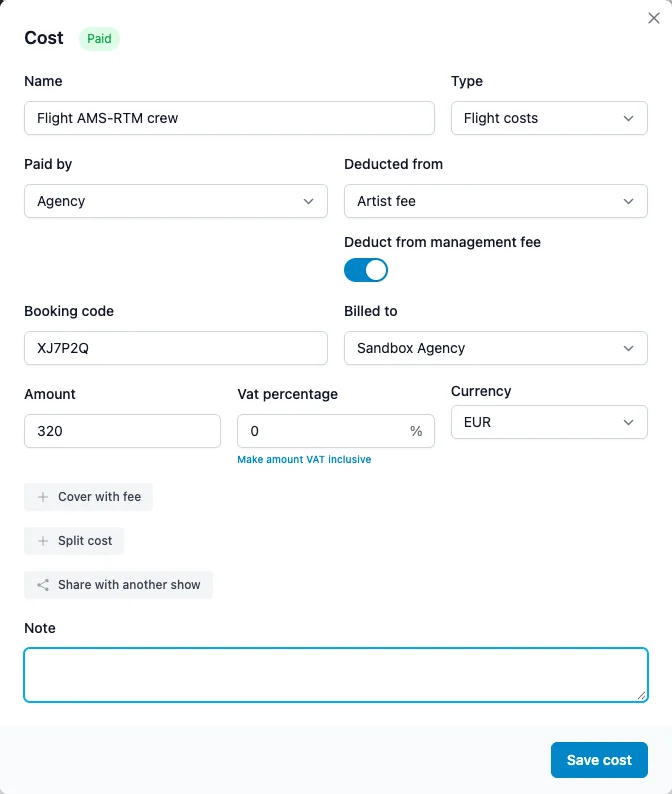
- Name: what it is, such as Flight AMS-RTM crew. It is printed like this on the statement.
- Type: Flight costs, Hotel costs, Accommodation, Parking costs, Crew, Visa, Buyout, Catering or Other. The type is used for filtering and for the totals per type.
- Paid by: who paid the bill: the Artist, the Agency, the Artist crew or Other.
- Deducted from: whose money the cost comes out of. See below.
- Booking code: the airline or hotel reference, such as a PNR. You can search on it later.
- Billed to: which of your legal entities the cost belongs to.
- Amount, Vat percentage and Currency: enter the amount without VAT. Do you only have the total including VAT? Enter that, fill in the VAT percentage and click Make amount VAT inclusive. Artistu works out the amount without VAT.
- Note: anything else, such as the flight times.
At the top of the editor you set the status of the cost: Draft, Invoiced, Paid, Credited or Voided. The status helps you keep track, but it does not change the statement. Click Save cost when you are done.
Deducted from: who carries the cost
This is the field that matters for the money:
| Deducted from | What happens |
|---|---|
| Artist fee | The cost lowers what the artist receives. It is listed on their statement. |
| — (empty) | The agency carries the cost. The artist's statement does not change. |
| Another fee | The cost is booked against that fee, such as the booking fee or a travel fee. |
When Deducted from is empty, Paid by decides: a cost paid by the Artist or the Artist crew is deducted from the artist fee, a cost paid by the Agency or Other is carried by the agency. New costs start with Paid by set to Agency and the status Paid, so change them when the artist paid or the bill is still open.
In the example the flight is deducted from the artist fee, so DJ Mosa's statement shows the €2,500 artist fee minus the €320 flight.
Deduct from management fee
When a cost is deducted from the artist fee, Deduct from management fee appears. It decides what the management fee is calculated on:
- On (the default): the management fee is calculated on the artist fee after the cost. With 15% management fee: 15% of €2,180.
- Off: the management fee is calculated on the full artist fee, before the cost. 15% of €2,500.
Use off when your management agreement says the commission is taken from the gross fee.
Split a cost between people
One flight booking often covers more than one person, and not everyone is paid the same way. The flight in the example covers DJ Mosa and the tour manager. Say the artist only pays for their own seat, and the agency pays for the tour manager.
Click Split cost in the editor, or Split cost in the ⋮ menu, which splits the cost in two halves straight away:
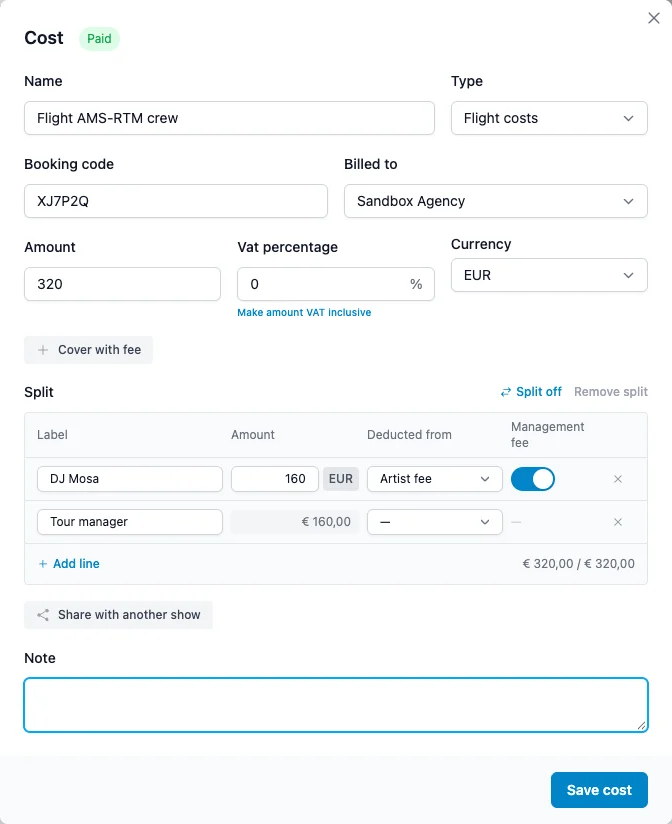
Each line has its own Label, Amount, Deducted from and Management fee setting:
- Type an amount, or click EUR to switch the line to a percentage.
- The last line is the remainder: it takes whatever the other lines leave. Click its amount to fix it instead.
- The total below the lines shows whether the lines add up to the cost. When they add up to more, Artistu tells you.
- Click Add line for a third person.
On the statement the artist line appears as Flight AMS-RTM crew (DJ Mosa), €160. The tour manager's half is carried by the agency.
Do you want the lines to become separate costs, for example to give each its own status? Click Split off, select the lines and click Split selected. Remove split turns the lines back into one cost.
Cover a cost with a fee
Sometimes the promoter pays for part of a cost. In the example, the deal has a €200 catering buyout: the promoter pays €200 instead of providing dinner. The crew dinner cost €260. The buyout covers €200 of it.
Open the cost and click Cover with fee. Pick the fee that pays for it: any fee on the booking, or a buyout from the deal terms:
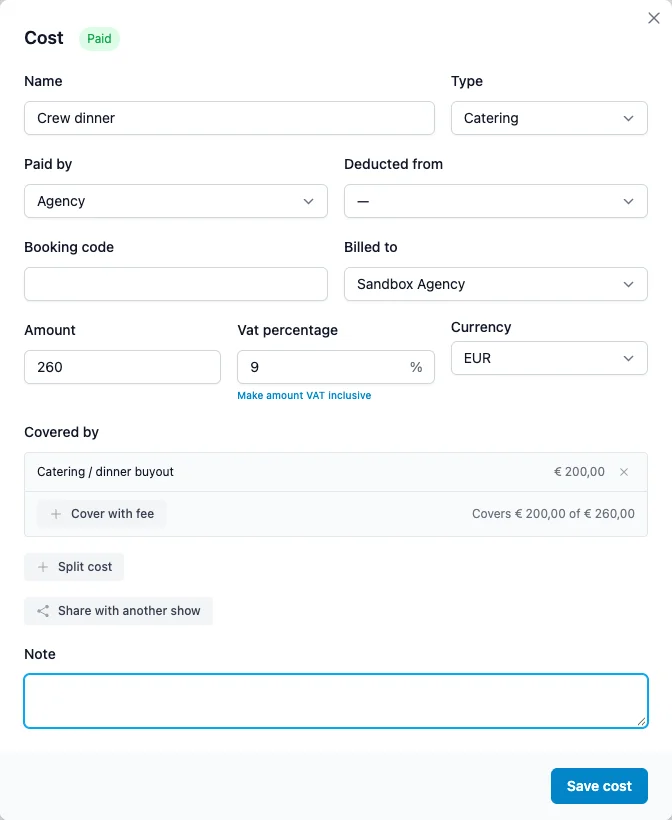
- Covers €200 of €260 shows how much is covered.
- The rest, €60 here, follows the Deducted from of the cost. Here it is empty, so the agency carries it.
- When the fee changes, for example because the buyout in the deal terms goes up, the covered amount follows.
In the Costs card, a covered cost shows the covered part in green below the amount.
Share a cost across shows
A flight or a hotel often belongs to more than one show. Say DJ Mosa plays Barcelona the night before and flies from Barcelona to Rotterdam. That flight belongs to both shows.
Open the cost, click Share with another show and pick the other booking from the calendar. Enter the Reason and the Share, as a percentage or an amount:
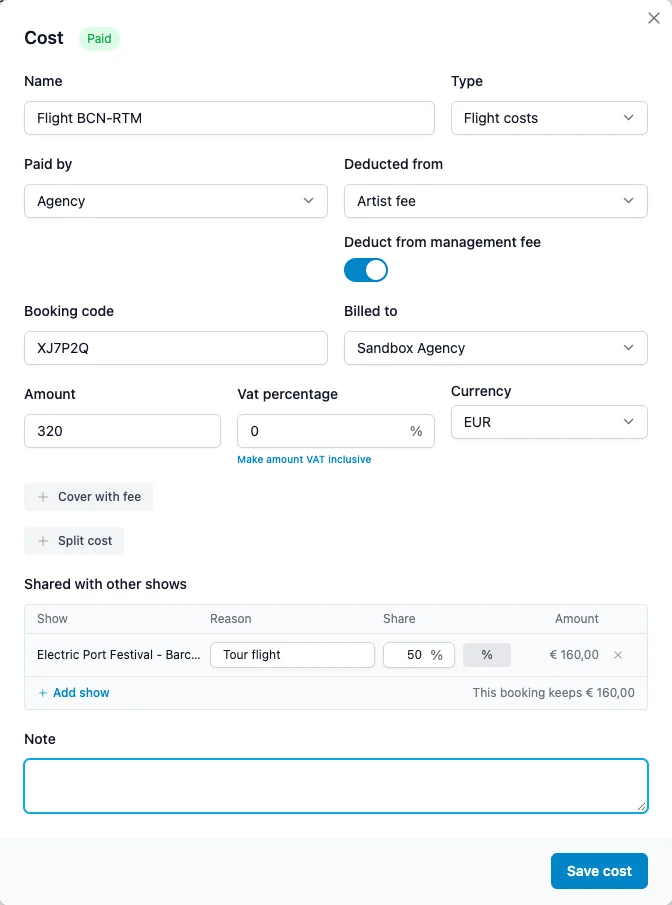
- This booking keeps €160 shows what stays on this booking.
- The other booking gets a copy of its share, marked Shared from this booking. The copy is read-only there. Change the cost here and the copy follows.
- Click Add show to share with more shows.
Each booking's statement counts only its own share, so nothing is counted twice.
Locked statements stay locked
If the other booking is already in a saved statement, its share is not changed and Artistu warns you. Saved statements never change afterwards.
All costs at a glance
Financial > Costs lists the cost lines of all bookings in a period:
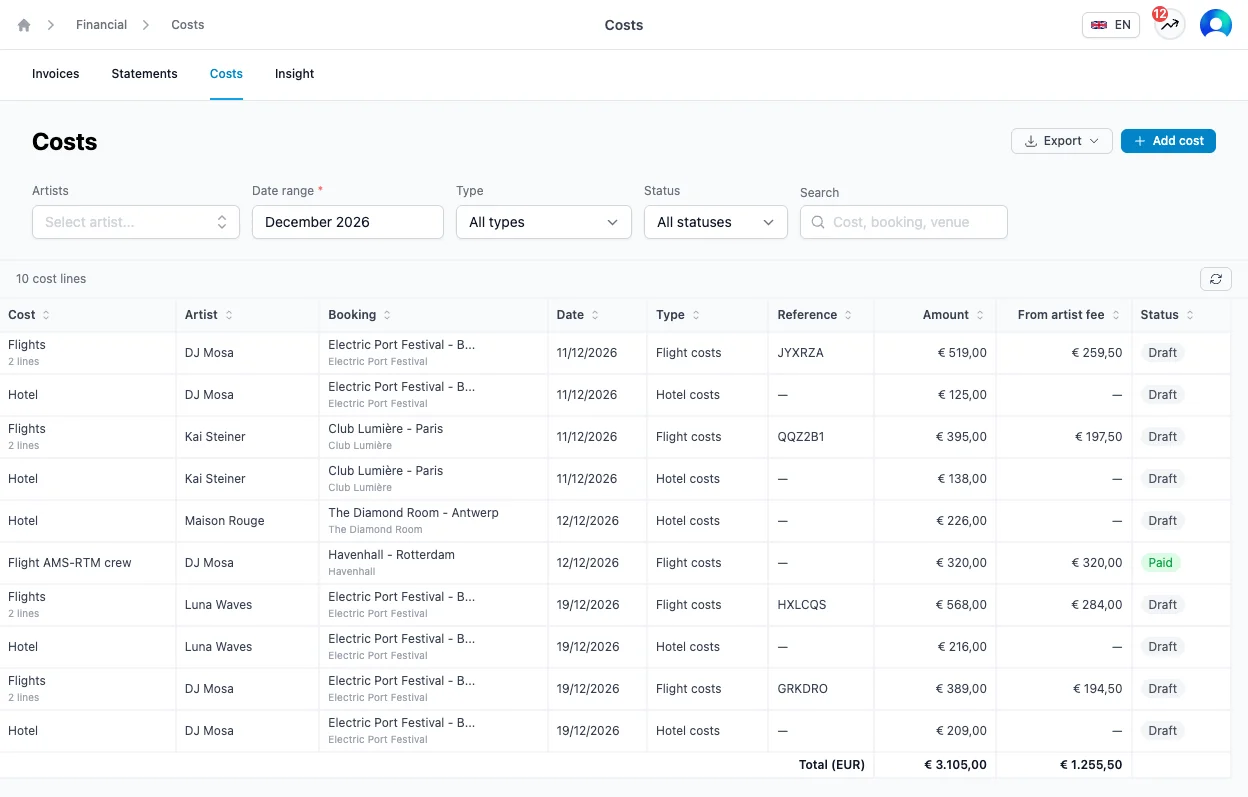
- Filter by Artists, Date range, Type and Status, and Search by cost, booking, venue or reference.
- From artist fee shows what each cost takes from the artist. The totals at the bottom are per currency.
- Click a cost to open it in the booking's deal editor. A shared copy opens the booking it was shared from.
- Add cost asks for the booking first, then opens the cost editor.
- Export downloads the list as a PDF or a CSV file, for your accountant or for the artist.
What's next
The costs deducted from the artist fee, together with the fees and the management fee, make up the artist's statement and payout. See Statements.