Financial
How money flows through Artistu
Every amount in Artistu starts on a booking and ends on a statement. This article follows one booking through every step, so you see where each number comes from and where it goes next.
- 1
Deal terms
What you agreed with the promoter: guarantee, booking fee, buyouts and when they pay.
- 2
Fees
The lines you invoice: artist fee, booking fee and buyouts.
- 3
Invoices
One invoice per payment from the schedule, sent by email or Peppol.
- 4
Costs
Flights, hotels and crew: who paid them and whose fee they come out of.
- 5
Statement
What the artist has earned over a period, after costs and management fee.
- 6
Payout
What you transfer to the artist, recorded and invoiced.
The example booking
We use one booking throughout this article:
- DJ Mosa at Havenhall, Rotterdam on 12 December.
- A guarantee of €2,500, plus a 20% booking fee on top: €500 for the agency.
- A €200 catering buyout: the promoter pays €200 instead of providing dinner.
- The promoter pays 50% on signing, the rest 14 days before the show, and the booking fee 14 days before the show.
- The agency paid a €320 flight for the artist and takes it out of the artist fee.
1. Deal terms: what you agreed
Open the booking and go to the Deal tab. Under Deal terms, enter what you agreed with the promoter:
- Guarantee: the minimum the artist gets.
- Booking fee: a percentage, charged on top of the guarantee or included in the guarantee.
- Per ticket, door % and sell-out bonus for deals that depend on ticket sales.
- Buyouts: fixed amounts the promoter pays instead of providing something, such as catering or a hotel.
- Payment schedule: when the promoter pays what.
- Promoter provides: what the promoter takes care of, such as the hotel or ground transport.
Start from a template
Set up deal templates per artist, so a new booking starts with the usual fee, booking fee and deal terms already filled in.
2. Fees: what you will invoice
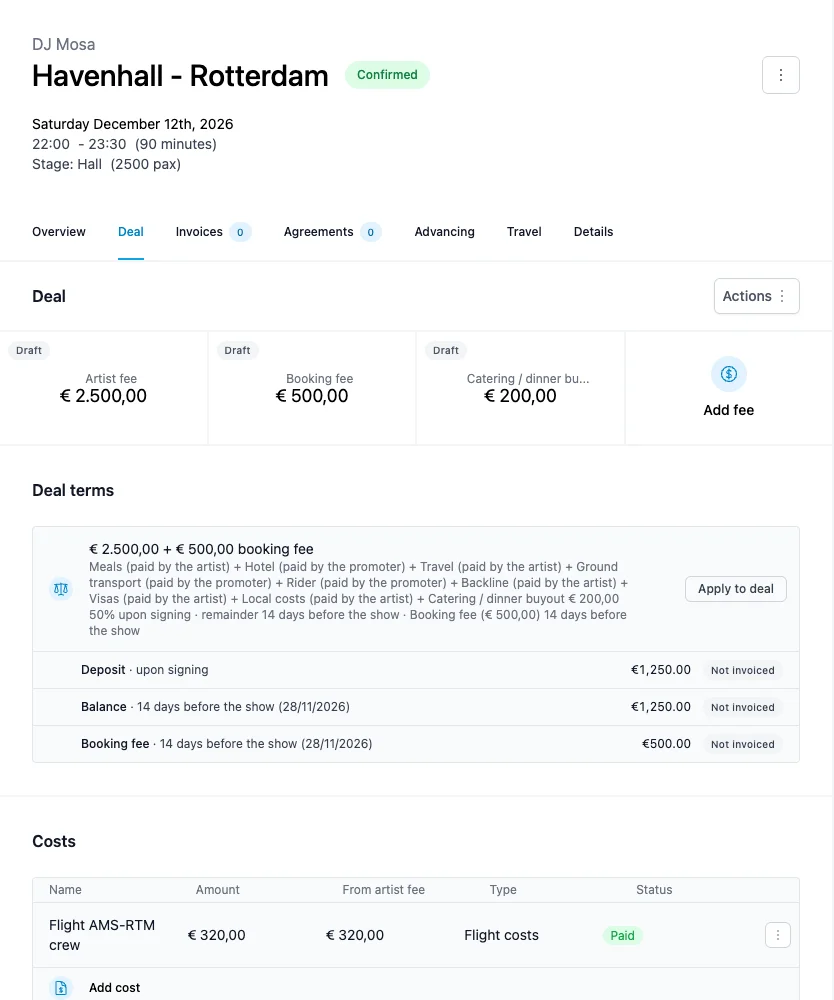
Deal terms describe the agreement. Fees are the lines you actually invoice. Click Apply to deal to turn the terms into fee lines. For the example that gives three lines:
| Fee line | Amount |
|---|---|
| Artist fee | €2,500 |
| Booking fee | €500 |
| Catering / dinner buyout | €200 |
A few things to know:
- Saving the deal terms does not change the fees. When the two differ, a Fees out of sync label appears next to Apply to deal.
- Fees that are already invoiced stay as they are. Applying the deal again only updates lines that are not on a sent or paid invoice.
- Per ticket, door % and sell-out bonus never become fee lines, because the amount is only known after the show. Add them as a fee once you know the amount.
- Each fee line has a status (Draft, Invoiced, Paid, Credited) that follows the invoices it is on.
3. Payment schedule: when the promoter pays
The payment schedule splits the fees into payments. Every payment shows its amount and due date under the deal terms:
| Payment | When | Amount |
|---|---|---|
| Deposit | 50% on signing | €1,250 |
| Balance | Remainder, 14 days before | €1,250 |
| Booking fee | Booking fee, 14 days before | €500 |
Percentages and remainders split what the Booking fee and Artist fee payments leave. Here that is the €2,500 guarantee, so 50% is €1,250.
Split payments over decides what the schedule covers:
- Guarantee: the artist fee, plus the booking fee when it is included in the guarantee or has its own payment, as in the example. The €200 buyout is invoiced separately.
- All fees: every fee line, including buyouts.
4. Invoices: asking the promoter to pay
Go to the Invoices tab and click Create an invoice. Artistu asks which payment from the schedule you want to invoice, or lets you start from a blank invoice.
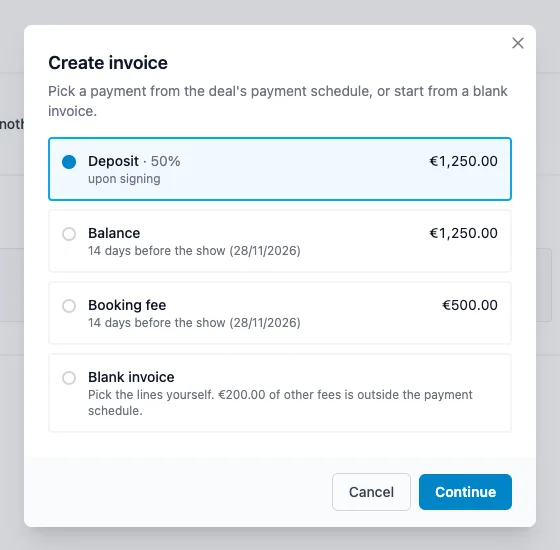
Pick Deposit and the invoice opens with the artist fee line for €1,250 already filled in, a due date from the schedule, and the promoter as the recipient. Then:
- Create saves the invoice as a draft.
- Create and send emails it to the promoter.
- Send with Peppol delivers it straight into the promoter's accounting software.
When the money arrives, click Mark as paid. Artistu does not collect payments itself, so you record them yourself.
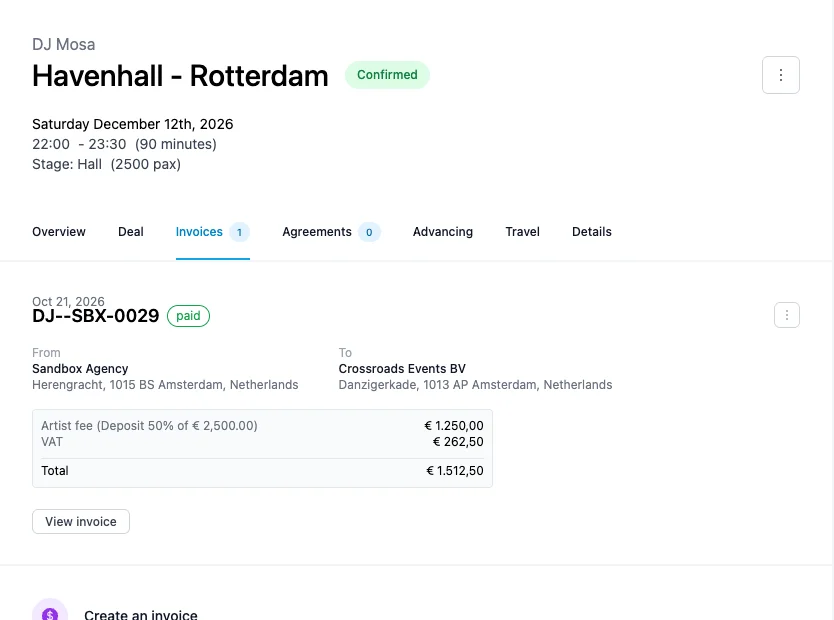
A sent invoice is locked. To correct it, credit it and create a new one. Invoices made in another system can be added with Record an invoice from another system, so the booking still shows the full picture.
5. Costs: what the show cost
Costs live in the Costs card on the Deal tab. For each cost you set:
- Paid by: the artist, the agency, the artist's crew or someone else.
- Deducted from: whose money the cost comes out of. Choose Artist fee and the cost lowers what the artist receives. Leave it empty and the agency carries it.
In the example, the agency paid a €320 flight and deducts it from the artist fee. You can also split a cost between parties, cover it with a fee the promoter pays, or share one cost across several shows. See Costs.
6. Statements: what the artist has earned
Go to Financial > Statements, pick the artist and the period. Every booking in that period gets a row:
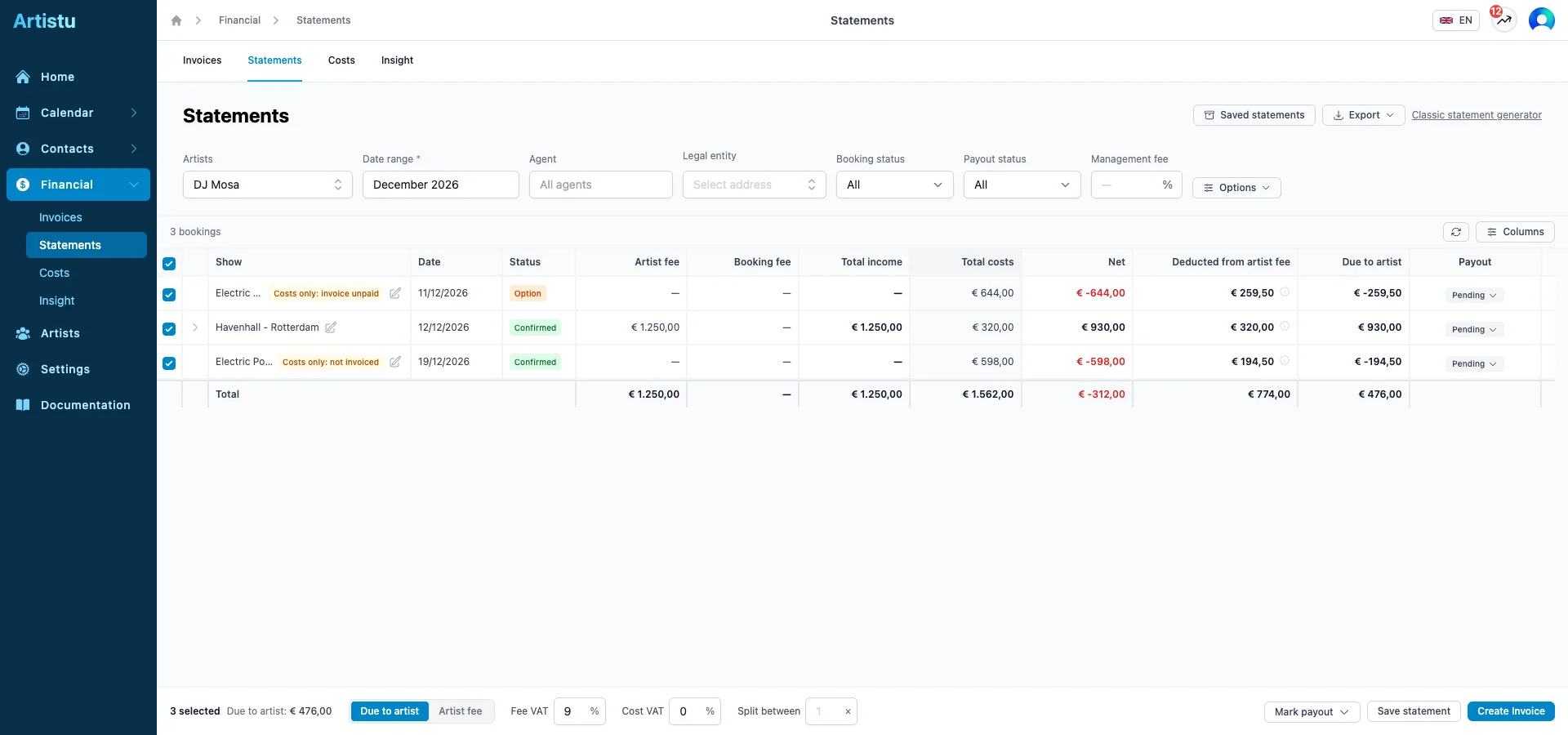
For each booking, the statement works out what the artist is owed:
Due to artist = artist fee − costs deducted from the artist fee − withholding tax + other fees marked as due to the artist
With a management fee percentage, that fee is subtracted as well, which gives the payout.
For the example booking, only the deposit is paid so far: €1,250 artist fee − €320 flight = €930 due to the artist. Once the balance is paid, the row grows to €2,500 − €320 = €2,180.
The booking fee shows as agency income in the statement, but it never reaches the artist's payout.
Which invoices count
By default a statement only counts paid invoices, so the artist is paid for money that actually came in. Turn off Paid invoices only in Options to also count sent and draft invoices. Credited and voided invoices never count. Rows marked Costs only are shows with costs but no paid income yet.
7. Payout: paying the artist
From the same statement:
- Mark payout sets each booking to Pending, Ready or Paid, and Record payment registers partial payments.
- Create Invoice turns the selection into a payout invoice, optionally with the management fee on a separate invoice.
- Save statement freezes the statement, so a booking cannot end up in two statements.
- Export gives you a PDF to send to the artist, or a CSV for your accountant.
Where to find what
| You want to | Go to |
|---|---|
| Enter what you agreed | Booking > Deal > Deal terms |
| Create the lines to invoice | Booking > Deal > Apply to deal |
| Invoice a payment | Booking > Invoices |
| Add a flight, hotel or crew | Booking > Deal > Costs |
| See all invoices | Financial > Invoices |
| See all costs | Financial > Costs |
| Work out and pay the artist | Financial > Statements |
| See totals per artist or period | Financial > Insight |