Bookings
Deal terms and payment schedule
The deal terms are the agreement with the promoter, written down once. Artistu uses them to create the fee lines, to split the money into payments, to fill in the agreement and to tell you which payment is still open.
This article uses the same example as How money flows through Artistu: DJ Mosa at Havenhall, Rotterdam, a €2,500 guarantee, a 20% booking fee on top, a €200 catering buyout, and half on signing, the rest 14 days before the show.
Where to find it
Open the booking and go to the Deal tab. On a booking without a deal you choose how to start:
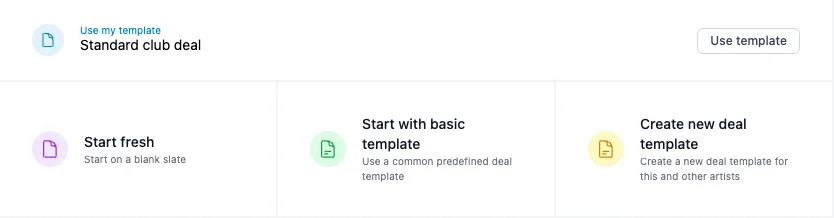
- Use template fills in the artist's own deal template, such as a standard club deal.
- Start fresh starts with empty fields.
- Start with basic template uses a common deal that fits most bookings.
- Create new deal template saves a template you can reuse for this and other artists.
Templates save the most time
A deal template can hold the deal terms and the payment schedule as well as the fees. Set it up once per artist and most bookings only need the guarantee changed.
The deal terms editor
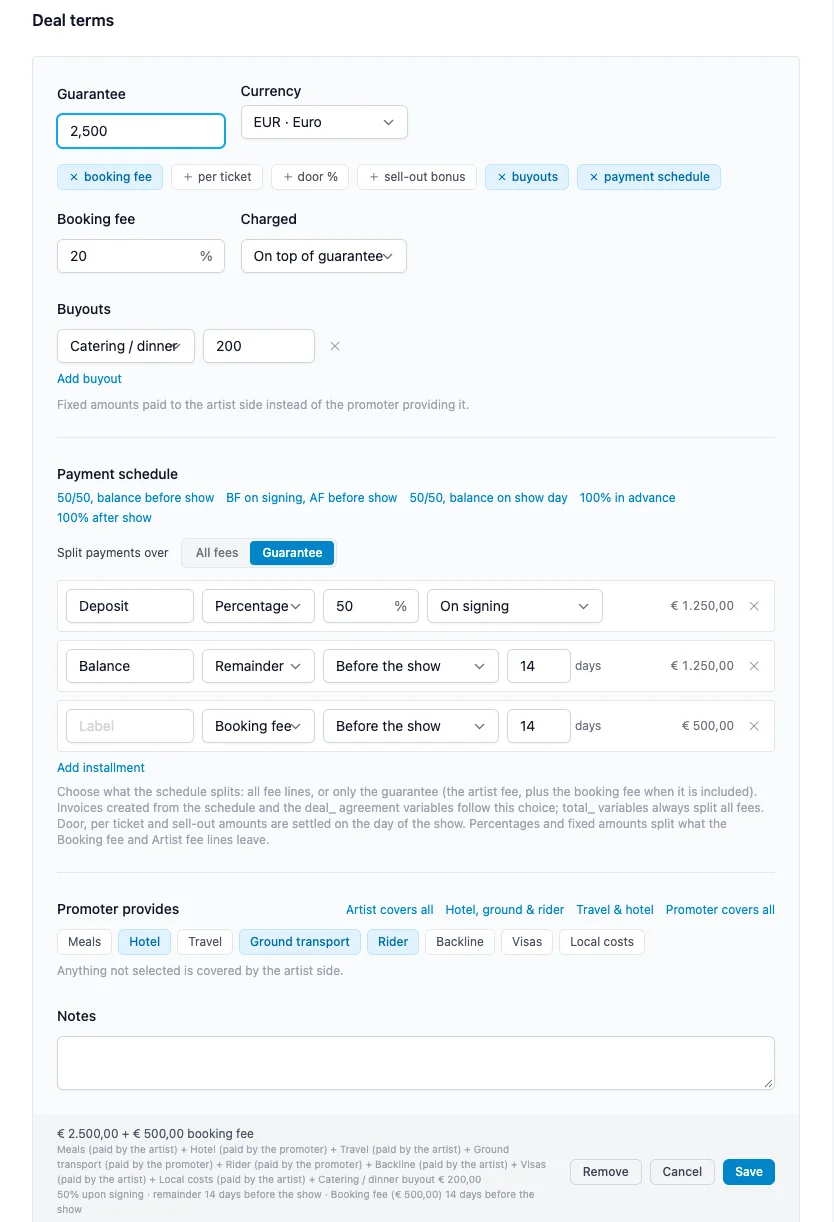
Click Set deal terms, or click the deal terms card to change them. The editor opens with the guarantee and currency at the top. Everything else is an add-on you switch on with the buttons below it.
Guarantee and currency
The guarantee is the fixed amount the artist is paid, whatever the ticket sales. The currency applies to the whole deal and to the fee lines created from it.
Booking fee
Switch on booking fee and enter the percentage. Under Charged choose how it relates to the guarantee:
- On top of guarantee: the promoter pays the guarantee plus the booking fee. €2,500 + 20% gives an artist fee of €2,500 and a booking fee of €500. The promoter pays €3,000.
- Included in guarantee: the guarantee is the total the promoter pays, and the booking fee is taken out of it. €2,500 including 20% gives a booking fee of €416.67 and an artist fee of €2,083.33.
Ticket deals: per ticket, door % and sell-out bonus
For shows where the artist shares in the ticket sales, switch on one or more of these:
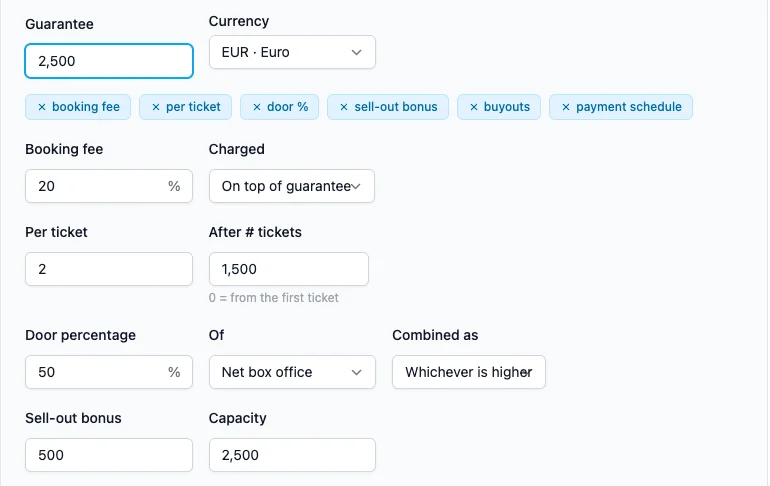
- Per ticket: an amount per ticket sold. With After # tickets it only starts counting after that many tickets. 0 means from the first ticket.
- Door percentage: a share of the Gross box office or the Net box office. Under Combined as, choose Added together (guarantee plus the door share) or Whichever is higher (a versus deal: the artist gets the guarantee or the door share, whichever is more).
- Sell-out bonus: an extra amount when the show sells out, with the Capacity of the venue.
The example above reads as: €2,500 versus 50% of the net box office, plus €2 per ticket after 1,500 tickets, and a €500 bonus at 2,500 tickets.
These amounts are only known after the show, so they never become fee lines and are not part of the payment schedule. Settle them after the show by adding a fee with the final amount.
Buyouts
A buyout is a fixed amount the promoter pays instead of providing something, such as Catering / dinner, Hotel, Travel / flights or Ground transport. Click Add buyout, pick the item and enter the amount. Each buyout becomes its own fee line and is marked as due to the artist, so it ends up in the artist's statement.
Promoter provides
Click what the promoter takes care of: Meals, Hotel, Travel, Ground transport, Rider, Backline, Visas or Local costs. Anything you leave off is covered by the artist side. The shortcuts above the list set common combinations at once: Artist covers all, Hotel, ground & rider, Travel & hotel and Promoter covers all.
Notes
Anything that does not fit a field, such as a curfew or a radius clause. The notes can be printed in the agreement.
Click Save when you are done. The bar at the bottom of the editor shows the full deal in one sentence before you save, the same sentence that appears on the deal terms card and in the agreement.
The payment schedule
Switch on payment schedule to agree when the promoter pays what. Start from a shortcut and adjust it:
- 50/50, balance before show
- BF on signing, AF before show: the booking fee on signing, the artist fee before the show.
- 50/50, balance on show day
- 100% in advance
- 100% after show
Each row is one payment, called an installment. Give it a Label such as Deposit or Balance, then choose what it covers:
| Type | What it covers |
|---|---|
| Percentage | A percentage of the amount being split |
| Fixed amount | A set amount |
| Remainder | Whatever the other rows leave over |
| Booking fee | The full booking fee line, as its own payment |
| Artist fee | The full artist fee line, as its own payment |
And when it is due:
| When | Due date |
|---|---|
| On signing | The day the agreement is signed |
| After signing | A number of days after the agreement is signed |
| Before the show | A number of days before the show |
| On the day of the show | The show date |
| After the show | A number of days after the show |
| After invoice date | A number of days after the invoice date |
The amount of every row is shown on the right while you edit. If the rows do not add up to 100%, Artistu tells you how much is not scheduled yet, or that the schedule adds up to more than 100%.
What the schedule splits
Split payments over decides which amount the percentages and the remainder work on:
- Guarantee: the artist fee, plus the booking fee when it is included in the guarantee. Buyouts are invoiced separately.
- All fees: every fee line on the booking, including buyouts and any other fee you added by hand.
Booking fee and Artist fee rows take their line out first. Percentage, fixed and remainder rows split what is left.
In the example, the schedule is split over the guarantee and the booking fee has its own row. The booking fee row takes the €500, so 50% and the remainder split the €2,500 artist fee:
| Payment | When | Amount |
|---|---|---|
| Deposit | On signing | €1,250 |
| Balance | 14 days before show | €1,250 |
| Booking fee | 14 days before show | €500 |
With All fees and without the booking fee row, the same 50/50 would split €3,200 (artist fee, booking fee and buyout) into two payments of €1,600.
From deal terms to fees
Deal terms describe the agreement. The fee lines at the top of the Deal tab are what you actually invoice. Click Apply to deal to create or update them from the deal terms:
| Deal term | Fee line |
|---|---|
| Guarantee | Artist fee |
| Booking fee | Booking fee |
| Each buyout | One line per buyout |
- Saving the deal terms does not change your fees. When the two differ, a Fees out of sync label appears next to Apply to deal.
- Invoiced lines are left unchanged. A line on a sent or paid invoice is locked. Applying the deal again only updates the other lines, and Artistu tells you when it skipped one.
- Other fees stay. A travel or crew fee you added by hand is left alone. Apply to deal only updates the artist fee, the booking fee and the buyout lines.
Following the payments
After saving, the deal terms card lists every payment with its due date, amount and status:
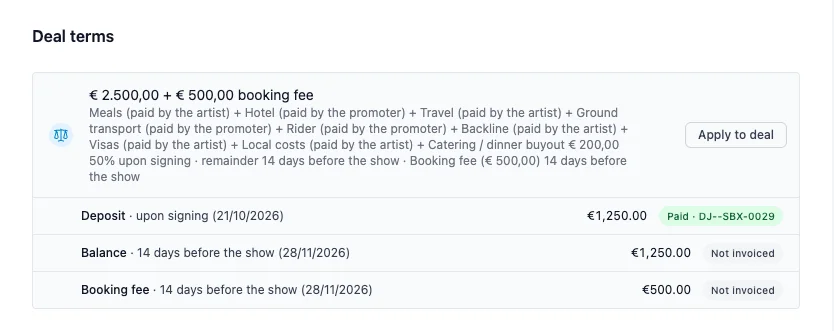
- Not invoiced: no invoice for this payment yet. Click the label to create the invoice for this payment straight away.
- Draft, Sent, Overdue or Paid, with the invoice number: the status of the invoice for this payment. Click it to open the invoice.
Due dates fill in as soon as they are known. A payment due on signing gets its date once the agreement is signed.
You can also invoice a payment from the Invoices tab with Create an invoice. Artistu asks which payment you want to invoice and fills in the amount and due date. How money flows through Artistu shows that step.
In the agreement
Agreement templates can print the deal with variables. The most used ones:
| Variable | Prints |
|---|---|
deal_payment_schedule | The payment schedule in one sentence |
deal_deposit | The first payment with its due moment |
deal_deposit_amount | The amount of the first payment |
deal_balance_due | The last payment with its due moment |
deal_balance_due_amount | The amount of the last payment |
deal_promoter_provides | What the promoter provides |
deal_artist_provides | What the artist side covers |
deal_buyouts | The buyouts with their amounts |
deal_notes | The notes |
The deal_ amount variables follow your Split payments over choice. The total_ versions, such as total_deposit_amount, always split all fees. Every amount variable also has an _inc_vat version. The full list is in the variable picker of the agreement template editor.
Hide what you never use
If your agency never does door deals or visas, hide them. In a deal template, open the deal terms and use Fields in use to turn off add-ons, promoter provides items and buyouts. Hidden fields no longer show on bookings, in deal summaries or in agreements. Expand deal terms by default opens the editor straight away on bookings that have no terms yet.